How to Pay for AI APIs from Bangladesh (bKash, Nagad, Crypto)
Most AI APIs need a US credit card. Here is how to pay with bKash, Nagad, or crypto instead — and what the process actually looks like.
Contents
- The actual problem
- What people currently do
- Virtual dollar cards
- Borrowing someone else's card
- Reseller accounts
- Crypto through an exchange
- Paying directly with bKash or Nagad
- How it works
- Why the TrxID matters
- Screenshot as backup
- Paying with crypto
- What this actually unlocks
- Getting started without paying anything
- Practical tips
- If something goes wrong
- Next steps
The technical barrier to building with AI is low. The payment barrier is not.
Most AI API providers accept only international credit cards. If you are in Bangladesh — or India, Pakistan, Nigeria, Egypt, or anywhere else where a USD-denominated card is not a given — you hit a wall before you write a line of code.
This explains the workarounds people use, why they are bad, and how paying with bKash, Nagad, or crypto actually works.
The actual problem#
To pay a typical AI API you need:
- An international credit card (Visa/Mastercard with USD capability)
- A card that supports recurring international charges
- Enough USD limit on it
- A billing address the provider accepts
In Bangladesh, an international card generally requires an endorsed passport, a dual-currency account, or a specific card product — and even then, the international limit is often small and the endorsement process slow.
The result is that developers with the skills and the intent cannot buy the product.
What people currently do#
Each of these has a real cost.
Virtual dollar cards#
Services issue a virtual USD card funded from a local account.
Cost: Issuance fee, 1.5–3% conversion, monthly maintenance. On $10 of API usage the fees can be a meaningful percentage.
Risk: Some providers flag virtual cards and decline them. Accounts get suspended after payment succeeds, sometimes with credit still on them.
Borrowing someone else's card#
A friend or relative abroad pays.
Cost: Social debt, plus the awkwardness of asking repeatedly.
Risk: Payment details do not match account details, which triggers fraud review. Recurring charges create ongoing dependence on someone else's card.
Reseller accounts#
Someone with a card resells access.
Cost: Their margin on top of the real price.
Risk: You do not control the account. If they stop, you lose access and any credit. Terms of service violations are common, which means the underlying account can be terminated.
Crypto through an exchange#
Buy USDT locally, pay a provider that accepts it.
Cost: Exchange spread plus network fees.
Risk: Few AI providers accept crypto directly, so this often routes through another intermediary.
Every option adds cost, risk, or dependence. None of them should be necessary.
Paying directly with bKash or Nagad#
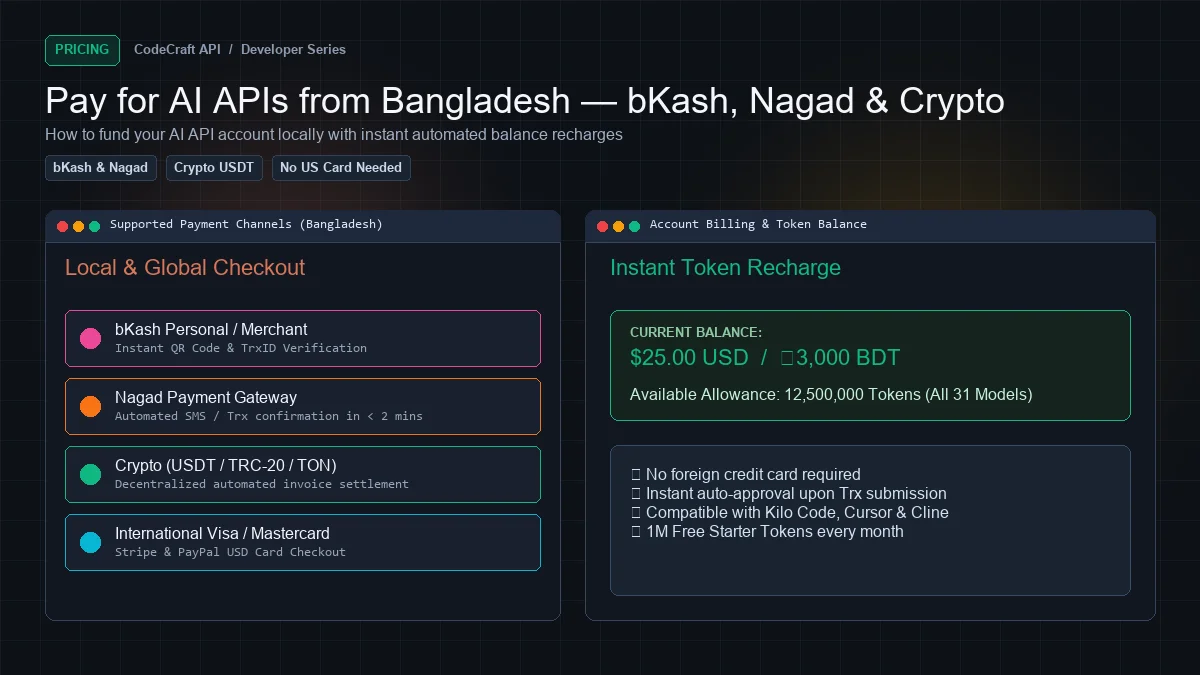
Clean APIs accepts bKash and Nagad as first-class payment methods, alongside Stripe, PayPal, and crypto.
How it works#
1. Choose a plan
Pick a plan on the pricing page — or start on the free tier and upgrade later.
| Plan | Tokens / month | Price | ≈ BDT |
|---|---|---|---|
| Free | 5M | $0 | — |
| Starter | 50M | $3.50 | $0.070 |
| Basic | 100M | $5.75 | $0.0575 |
| Pro | 200M | $9.50 | $0.0475 |
| Scale | 500M | $15.50 | $0.031 |
| Unlimited | No cap | $50 | ৳5,500 |
BDT amounts are approximate; the exact figure is shown at checkout.
2. Select bKash or Nagad
At checkout the total converts to BDT and you get the receiving number plus the exact amount.
3. Send the money
Open your bKash or Nagad app, choose Send Money, and send the exact amount shown. Sending a different amount slows verification.
4. Submit the transaction ID
After sending you get a confirmation SMS containing a TrxID. Enter it on the confirmation page along with the number you sent from.
5. Verification
Confirmation is normally quick. Our system matches your TrxID against the payment notification automatically.
If the amount does not match, or the TrxID cannot be found, the order moves to manual review rather than silently failing or activating. You will not be charged for a plan you did not receive.
Why the TrxID matters#
The TrxID is what proves the payment is yours. Amount alone is not enough — two people can send ৳633 in the same minute, and matching on amount would risk crediting the wrong account.
That is why we only auto-fulfil on an exact TrxID match with a sufficient amount. Everything else waits for a human. Slower in edge cases, but nobody gets someone else's plan.
Screenshot as backup#
If the TrxID is unclear or the SMS did not arrive, you can upload a screenshot of the confirmation instead. That routes to manual review.
Paying with crypto#
BTC and USDT (TRC-20) are supported. Choose crypto at checkout, send to the address shown, and the order confirms once the transaction settles.
Useful if you already hold crypto or want to avoid the local payment rails entirely.
What this actually unlocks#
Start free, then $1.20 for 30M tokens — roughly ৳132.
To put that in perspective: 30M tokens is about 3,750 agent file edits or 11,000 chat exchanges per month. For most solo developers and small teams that is more than enough, and it costs less than a single lunch.
At the top, unlimited is $50 (~৳5,500) with no monthly token cap.
Every plan reaches all 31 models. Plans differ in volume only — never in models, never in features. The free tier gets the same reasoning models, vision, tool calling, and streaming as the top tier.
Getting started without paying anything#
You do not need to solve payment before you start.
The free tier gives 5M tokens every month, no card, no verification. That is enough to:
- Set up an agent like Kilo Code
- Test every model against your real work
- Build and ship a side project
- Decide whether paid volume is worth it before you spend
Create a free account and only think about payment when you actually hit the limit.
Practical tips#
Send the exact amount. Rounding up or down means manual review.
Save your TrxID. Screenshot the SMS. If anything needs checking, that is what identifies your payment.
Use the same number consistently. Sending from the number on your account speeds verification.
Yearly is cheaper. Every plan's yearly price is ten months' worth — two months free. Fewer transactions, less fee overhead.
Watch your usage. Dashboard → Usage shows real token counts and cost per request. Set a usage alert in Settings → Notifications so you know before you run out, not after.
If something goes wrong#
Payment sent but not credited. Submit the TrxID on the order page if you have not. It moves to manual review and gets resolved.
Wrong amount sent. Note the TrxID and open a support ticket from Dashboard → Support. Do not send a second payment.
Order expired. Pending orders expire after 30 minutes. If you paid after expiry, open a support ticket with the TrxID — the payment is not lost.
Invoice needed. Every completed order generates an invoice under Dashboard → Billing → Invoices, downloadable for accounting.
Next steps#
- Pricing plans — full comparison
- Understanding token pricing
- How to reduce AI API costs
Start free — 5M tokens monthly, no card, no payment method needed.
Ready to build?
Everything in this article works on the free tier — 5M tokens every month, all 33 models, no card.