API Keys — Scopes, Rotation, and Not Leaking Them
How API key authentication works, why keys are hashed, when to scope them, and what to do the moment one leaks.
Contents
- How key authentication works
- How keys are stored
- Scopes
- Why new keys get all three by default
- When narrowing is worth it
- Multiple keys, on purpose
- Rotation
- If a key leaks
- Keeping keys out of your code
- Rate limits are per account, not per key
- Handling auth errors properly
- A short checklist
- Next steps
An API key is a bearer credential: whoever holds it can spend your money. That makes key management less about convenience and more about limiting damage when something goes wrong — because eventually it does.
This covers how keys work here, how to scope them, and the practical steps that keep a leak from becoming an incident.
How key authentication works#
Every request carries the key in a header:
curl https://cleanapis.com/v1/chat/completions \
  -H "Authorization: Bearer cc_your_key_here" \
  -H "Content-Type: application/json" \
  -d '{"model":"claude-opus-4.8","messages":[{"role":"user","content":"hi"}]}'
Clean APIs also accepts the Anthropic-style header, so clients like Claude Code work without a translation proxy:
curl https://cleanapis.com/v1/models \
  -H "x-api-key: cc_your_key_here"
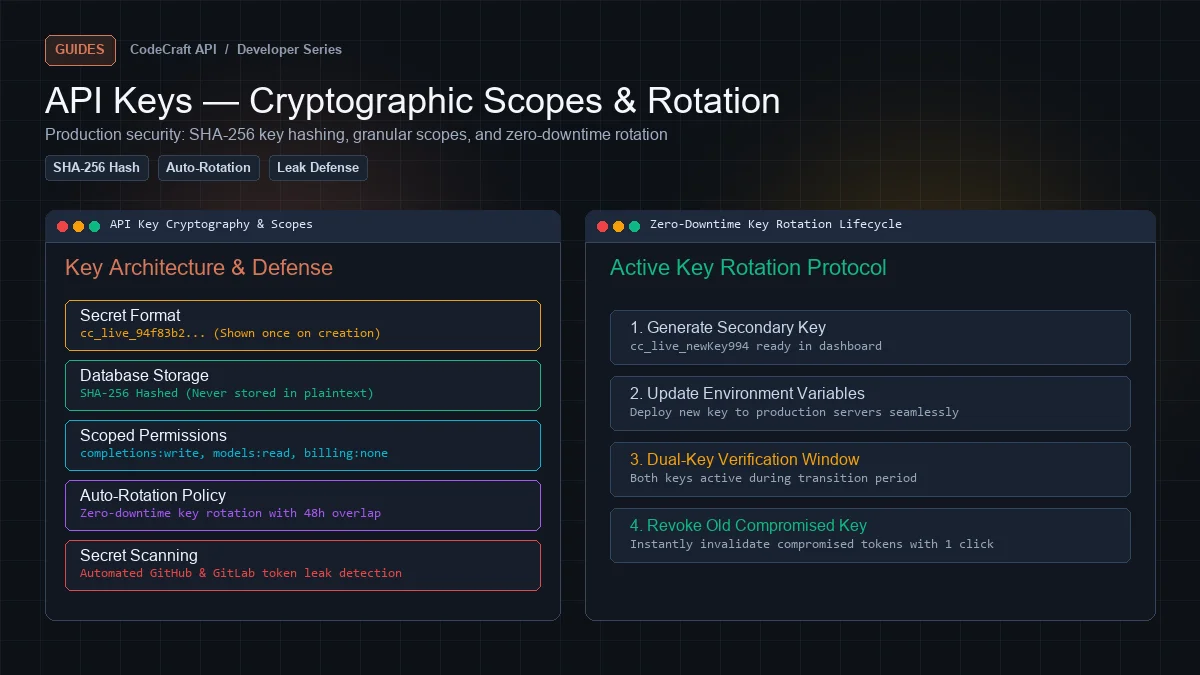
Keys begin with cc_ followed by 48 random characters. The prefix makes them recognisable in logs and secret scanners.
A missing or invalid key returns a clear error:
{
  "error": {
    "message": "Missing or invalid API key.",
    "type": "authentication_error",
    "code": "invalid_api_key"
  }
}
How keys are stored#
Two things are kept for each key:
A SHA-256 hash, used for lookup on every request. Indexed and compared in constant time.
An encrypted copy, so you can reveal and copy the key again in the dashboard.
The second part is a deliberate trade-off. Storing only a hash is marginally more secure but means a lost key can never be recovered — you must rotate. Every major provider stores a recoverable copy because the alternative generates constant support load.
The consequence: protect your application's encryption key as carefully as the database. A dump alone is not enough to read keys; a dump plus the encryption key is.
Scopes#
A key can be limited to a subset of the API:
| Scope | Grants |
|---|---|
inference |
POST /v1/chat/completions |
models:read |
GET /v1/models, GET /v1/models/{id} |
embeddings |
POST /v1/embeddings |
A request outside a key's scopes returns 403:
{
  "error": {
    "message": "This API key does not have the 'inference' scope required for this endpoint.",
    "type": "invalid_request_error",
    "code": "insufficient_scope"
  }
}
Why new keys get all three by default#
Because coding agents call GET /v1/models before their first message, to discover capabilities. A key with only inference produces an empty model list and a tool that appears broken.
Narrow deliberately, not by accident. The most common support question about scopes is "why is my model dropdown empty," and the answer is almost always a missing models:read.
When narrowing is worth it#
A browser-side key. OpenClaw and similar tools store the key in browser storage where anyone using that profile can read it. Give it inference + models:read, never embeddings if unused.
A read-only integration. A dashboard that lists models needs models:read only.
An embeddings pipeline. A RAG indexer needs embeddings only — no reason it can run completions.
Multiple keys, on purpose#
One key per context, not one key everywhere. Two reasons.
Attribution. Usage is logged per key, so separate keys tell you which tool or environment spent what:
prod-api        142,000 requests   $18.40
staging          12,000 requests    $1.55
kilo-code-local   3,400 requests    $2.10
openclaw-browser    210 requests    $0.14
With one shared key that is a single undifferentiated number.
Blast radius. Revoking a leaked key should not take down everything else. If your CI key leaks, revoke it without touching production.
A reasonable split:
| Key | Used by |
|---|---|
production |
Your live application |
staging |
Pre-production |
local-dev |
Your machine |
kilo-code |
Editor agent |
browser |
Any browser-side tool, narrow scopes |
Rotation#
Rotation revokes a key and issues a replacement with the same name and scopes, in one action.
Dashboard → API Keys → Rotate. The old key stops working immediately, and the new one is shown once.
Rotate when:
- A key may have leaked
- Someone with access leaves
- A key was used on a shared or borrowed machine
- On a schedule, for production credentials
The important caveat: the old key dies instantly. Update your deployment before rotating a production key, or plan for a brief window of 401s.
If a key leaks#
Order matters.
1. Revoke it. Immediately, before investigating. Dashboard → API Keys → Revoke. Effective on the next request.
2. Check usage. Dashboard → Usage, filtered to that key. Look for requests you did not make, unfamiliar models, or unusual volume.
3. Issue a replacement. Create a new key, or rotate a different one, and deploy it.
4. Find the leak. Committed to Git? In a client-side bundle? In a log? In a screenshot or a support ticket?
5. Purge history if it was committed. Revoking is enough to stop abuse, but a key in Git history will be found by scanners forever. Clean it or accept that it is public.
Keeping keys out of your code#
Never commit a key. Not in source, not in config, not in a test fixture.
Use environment variables:
import os
from openai import OpenAI

client = OpenAI(
    api_key=os.environ["CLEANAPIS_API_KEY"],
    base_url="https://cleanapis.com/v1",
)
Reference env vars in tool configs. opencode supports this directly:
{
  "provider": {
    "cleanapis": {
      "options": {
        "baseURL": "https://cleanapis.com/v1",
        "apiKey": "{env:CLEANAPIS_API_KEY}"
      }
    }
  }
}
The config file becomes safe to commit and sync.
Never put a key in frontend code. Anything in a browser bundle is public. Route requests through your own backend, which holds the key.
The exception is a tool like OpenClaw where the user supplies their own key in their own browser. That is their credential and their risk — which is why a dedicated, narrowly scoped key matters there.
Add a scanner. gitleaks, trufflehog, or GitHub secret scanning. The cc_ prefix makes our keys easy to match.
Rate limits are per account, not per key#
Worth knowing before you create ten keys expecting ten times the throughput.
Limits are enforced on your account:
| Plan | Requests/min | Tokens/min |
|---|---|---|
| Free | 60 | 100,000 |
| Starter | 120 | 200,000 |
| Basic | 300 | 500,000 |
| Pro | 600 | 1,000,000 |
| Scale | 1,200 | 2,000,000 |
| Unlimited | 3,000 | 5,000,000 |
Every response reports your position:
X-RateLimit-Limit: 600
X-RateLimit-Remaining: 597
X-RateLimit-Reset: 1787305980
X-RateLimit-Limit-Tokens: 1000000
X-RateLimit-Remaining-Tokens: 998412
Exceeding a limit returns 429 with Retry-After. Dashboard → Usage → Rate Limits shows live consumption for the current minute.
Handling auth errors properly#
Distinguish the cases — they need different responses:
from openai import OpenAI, AuthenticationError, PermissionDeniedError, RateLimitError

try:
    response = client.chat.completions.create(...)

except AuthenticationError:
    # 401 — key invalid or revoked. Do not retry.
    alert_ops("API key rejected")

except PermissionDeniedError:
    # 403 — missing scope. Do not retry.
    alert_ops("API key lacks required scope")

except RateLimitError as e:
    # 429 — retry after the header says
    wait = int(e.response.headers.get("Retry-After", 60))
    time.sleep(wait)
Retrying a 401 or 403 forever is a common bug — neither will ever succeed without human action.
A short checklist#
- One key per environment and per tool
- Narrow scopes where the key is exposed
- Environment variables, never committed
- Secret scanning in CI
- Rotate production keys on a schedule
- Revoke first, investigate second
- Watch per-key usage for anomalies
Next steps#
Create a free API key — 5M tokens monthly, scoped keys included.
Ready to build?
Everything in this article works on the free tier — 5M tokens every month, all 33 models, no card.