Streaming AI Responses with Server-Sent Events (Complete Guide)
How SSE streaming works, why connections drop, and how to handle chunks, tool call deltas, usage, and errors correctly in Python and JavaScript.
Contents
- How SSE streaming works
- Using an SDK
- Parsing it yourself
- Streaming reasoning separately
- Streaming tool calls
- Getting token usage from a stream
- Why streams drop, and how to stop it
- Provider timeouts
- Reverse proxy buffering
- PHP output buffering
- Handling errors mid-stream
- Client cancellation
- A checklist for correct streaming
- Next steps
Streaming is why ChatGPT feels fast. The model does not generate faster — you just start seeing output after 200ms instead of waiting 20 seconds for the whole thing.
For coding agents it matters more than perception: long tasks need a connection that survives, and a stream that carries tool calls correctly.
How SSE streaming works#
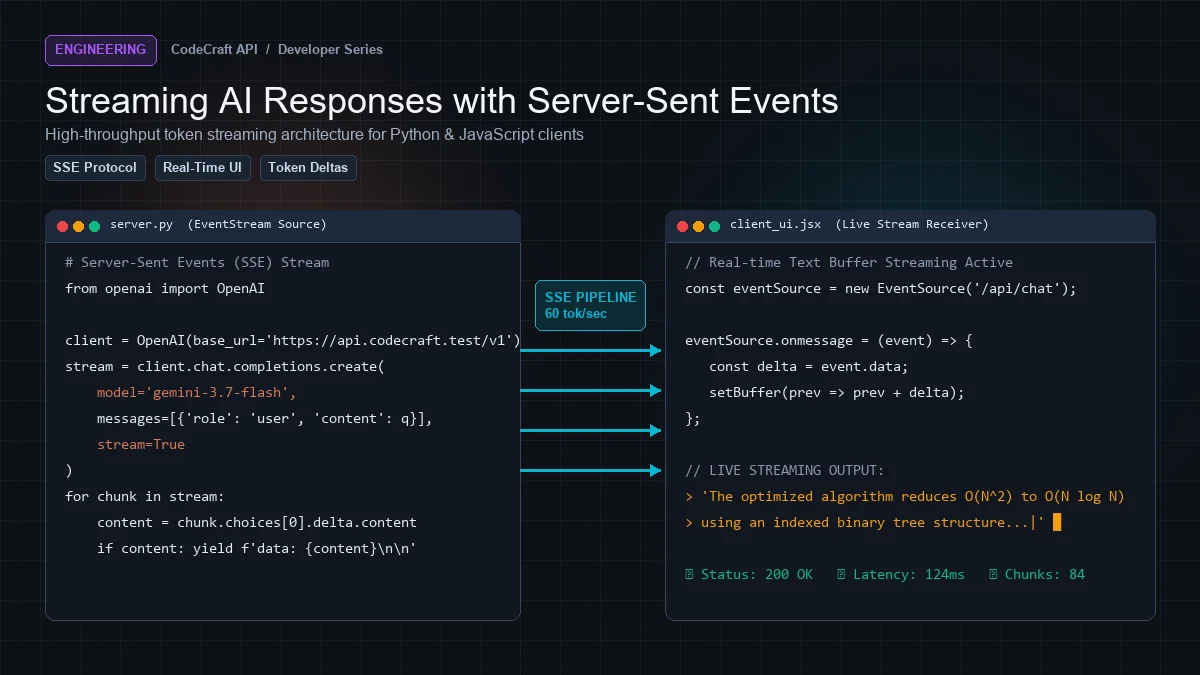
Set "stream": true and instead of one JSON response you get a text/event-stream — a sequence of data: lines pushed as the model generates.
curl https://cleanapis.com/v1/chat/completions \
  -H "Authorization: Bearer cc_your_key_here" \
  -H "Content-Type: application/json" \
  -N \
  -d '{
    "model": "claude-opus-4.8",
    "messages": [{"role": "user", "content": "Count to three"}],
    "stream": true
  }'
The -N disables curl's own buffering, which otherwise hides the effect entirely.
Output:
data: {"id":"chatcmpl-abc","object":"chat.completion.chunk","choices":[{"index":0,"delta":{"role":"assistant"},"finish_reason":null}]}

data: {"id":"chatcmpl-abc","object":"chat.completion.chunk","choices":[{"index":0,"delta":{"content":"One"},"finish_reason":null}]}

data: {"id":"chatcmpl-abc","object":"chat.completion.chunk","choices":[{"index":0,"delta":{"content":", two"},"finish_reason":null}]}

data: {"id":"chatcmpl-abc","object":"chat.completion.chunk","choices":[{"index":0,"delta":{},"finish_reason":"stop"}],"usage":{"prompt_tokens":12,"completion_tokens":9,"total_tokens":21}}

data: [DONE]
Four rules govern the format:
- Each event is
data:followed by one JSON object - Events are separated by a blank line
- Concatenate
choices[0].delta.contentto rebuild the message - The stream always ends with the literal
data: [DONE]
Using an SDK#
The official SDKs handle parsing for you.
Python:
from openai import OpenAI

client = OpenAI(api_key="cc_your_key_here", base_url="https://cleanapis.com/v1")

stream = client.chat.completions.create(
    model="claude-opus-4.8",
    messages=[{"role": "user", "content": "Write a haiku about databases"}],
    stream=True,
)

for chunk in stream:
    delta = chunk.choices[0].delta.content
    if delta:
        print(delta, end="", flush=True)
flush=True matters — without it Python buffers stdout and you lose the streaming effect.
JavaScript:
import OpenAI from "openai";

const client = new OpenAI({
  apiKey: "cc_your_key_here",
  baseURL: "https://cleanapis.com/v1",
});

const stream = await client.chat.completions.create({
  model: "claude-opus-4.8",
  messages: [{ role: "user", content: "Write a haiku about databases" }],
  stream: true,
});

for await (const chunk of stream) {
  process.stdout.write(chunk.choices[0]?.delta?.content ?? "");
}
Parsing it yourself#
Sometimes you need raw control — a custom proxy, a non-standard runtime, or a browser fetch.
const res = await fetch("https://cleanapis.com/v1/chat/completions", {
  method: "POST",
  headers: {
    "Authorization": "Bearer cc_your_key_here",
    "Content-Type": "application/json",
  },
  body: JSON.stringify({
    model: "claude-opus-4.8",
    messages: [{ role: "user", content: "Hello" }],
    stream: true,
  }),
});

const reader = res.body.getReader();
const decoder = new TextDecoder();
let buffer = "";

while (true) {
  const { done, value } = await reader.read();
  if (done) break;

  buffer += decoder.decode(value, { stream: true });
  const lines = buffer.split("\n");

  // Keep the last, possibly incomplete, line in the buffer
  buffer = lines.pop() || "";

  for (const line of lines) {
    if (!line.startsWith("data: ")) continue;

    const data = line.slice(6).trim();
    if (data === "[DONE]") break;

    try {
      const chunk = JSON.parse(data);
      const delta = chunk.choices?.[0]?.delta?.content;
      if (delta) process.stdout.write(delta);
    } catch {
      // Skip malformed fragments
    }
  }
}
The buffer handling is the part people get wrong. A network packet can split a line in half, so you must retain the trailing fragment and prepend it to the next read.
Streaming reasoning separately#
Reasoning models send their thinking as delta.reasoning_content, distinct from delta.content. It usually completes before the answer starts.
for chunk in stream:
    delta = chunk.choices[0].delta

    if getattr(delta, "reasoning_content", None):
        # Show a "thinking..." indicator
        print(delta.reasoning_content, end="", flush=True)

    if delta.content:
        print(delta.content, end="", flush=True)
This is what makes a "thinking" panel possible — you can render reasoning live and collapse it once the answer arrives.
Streaming tool calls#
Tool call arguments arrive in fragments. Accumulate by index and parse only at the end:
calls = {}

for chunk in stream:
    for delta in (chunk.choices[0].delta.tool_calls or []):
        c = calls.setdefault(delta.index, {"id": None, "name": None, "args": ""})
        if delta.id:
            c["id"] = delta.id
        if delta.function.name:
            c["name"] = delta.function.name
        if delta.function.arguments:
            c["args"] += delta.function.arguments

# Only now is the JSON complete
import json
for c in calls.values():
    args = json.loads(c["args"])
Attempting json.loads on a partial arguments string is the single most common streaming bug in agent code.
Getting token usage from a stream#
Non-streaming responses always include usage. Streaming ones only do if the provider is asked.
Clean APIs requests it automatically, so the final chunk before [DONE] carries real counts:
{
  "choices": [{"index": 0, "delta": {}, "finish_reason": "stop"}],
  "usage": {"prompt_tokens": 12, "completion_tokens": 9, "total_tokens": 21}
}
Read it from the last chunk:
usage = None

for chunk in stream:
    if chunk.usage:
        usage = chunk.usage
    # ... handle deltas

print(f"Used {usage.total_tokens} tokens")
Without this you are estimating, and estimates drift — especially with reasoning models where most output is invisible.
Why streams drop, and how to stop it#
This is where most self-hosted setups fail.
Provider timeouts#
Many APIs close a stream after a few minutes. A long agent task dies mid-refactor.
Clean APIs holds streaming connections open up to one hour, with a keep-alive comment (: ping) every 15 seconds so intermediaries do not consider the channel idle.
Reverse proxy buffering#
If you sit behind nginx or Apache, they will buffer the response by default — collecting chunks and forwarding them in batches. The stream technically works but arrives all at once, so the client looks frozen.
location /v1/ {
    proxy_pass http://backend;
    proxy_read_timeout 3700s;
    proxy_buffering off;          # essential
    proxy_cache off;
}
Timeout 3700
ProxyTimeout 3700
We send X-Accel-Buffering: no, which nginx respects — but only if your config does not override it.
PHP output buffering#
Serving SSE from PHP requires flushing explicitly, and guarding the flush:
echo "data: " . json_encode($chunk) . "\n\n";

if (ob_get_level() > 0) {
    @ob_flush();     // only if a buffer is actually active
}
flush();
Calling ob_flush() with no active buffer emits a warning — straight into your SSE stream, corrupting the JSON the client is trying to parse.
Handling errors mid-stream#
Once headers are sent you cannot change the status code. Errors have to arrive inside the stream:
data: {"error":{"message":"Upstream provider unavailable","type":"provider_error","code":502}}

data: [DONE]
So every parsed chunk needs an error check:
for chunk in stream:
    if hasattr(chunk, "error") and chunk.error:
        raise RuntimeError(chunk.error.message)
    # ... handle deltas
Clean APIs checks the upstream HTTP status before opening the stream, so a 429 or 401 from the provider comes back as a clean error frame rather than an unparseable body. It also logs the failure to your usage history so you can see what happened.
Client cancellation#
Users interrupt streams constantly — wrong answer, they got it themselves, they changed their mind.
Two things should happen when they do:
Stop generating. Closing the connection is enough; the request is abandoned.
Still account for what was generated. Tokens the provider produced were real. Clean APIs bills and logs them, so your usage dashboard reflects actual spend rather than only completed requests.
A checklist for correct streaming#
- Buffer partial lines across reads, do not assume line boundaries
- Terminate on
data: [DONE] - Accumulate tool call
argumentsbefore parsing - Read
usagefrom the final chunk - Check every chunk for an
errorkey - Disable proxy buffering
- Set proxy timeouts above your longest expected stream
- Flush output explicitly, and guard the flush
Next steps#
Get a free API key — 5M tokens monthly, streaming on every plan.
Ready to build?
Everything in this article works on the free tier — 5M tokens every month, all 33 models, no card.